
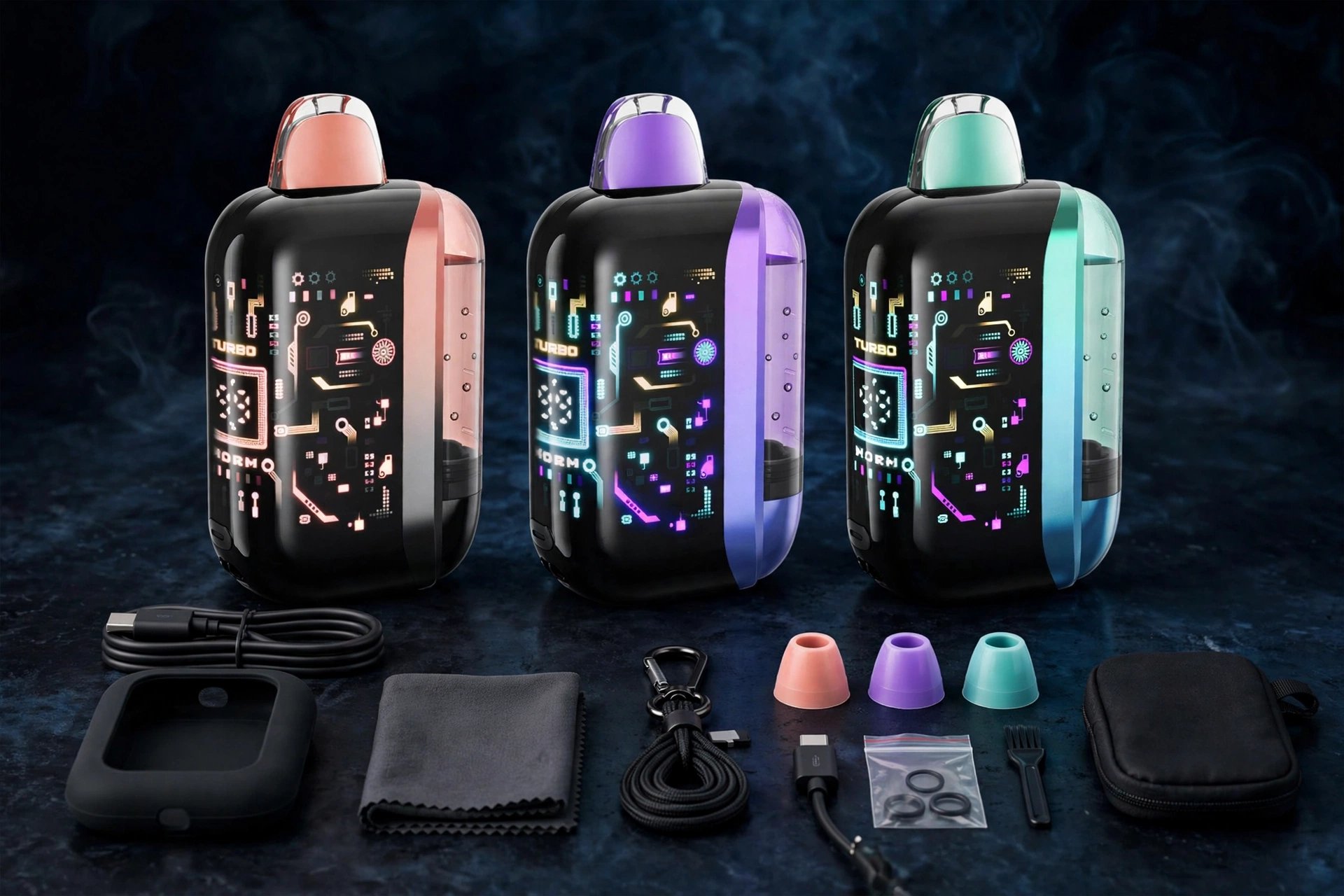
The NEXA Ultra II 50K is a two-part device, and that split design is the first thing to understand when it stops working. It has a battery section and a clear crystal tank that clicks onto it. The tank holds the e-liquid, and the battery holds the power, the screen, and the coil controls. When the two parts are not joined right, the device will not fire, the screen may flash an E2 error, or the draw may feel empty even though the battery is full.
This guide walks through the ten most common problems on the NEXA Ultra II 50K, one at a time, with causes, safe fixes, and a clear point where you should stop and replace the device.
The NEXA Ultra II 50K is built for adults 21 and older in the United States. It contains nicotine, which is addictive. Keep it away from children and pets, and do not use it if the battery feels hot, swollen, or damaged.
Safety first: never charge a device that feels hot to the touch, smells burnt, or has a cracked tank or a swollen battery section. Unplug it, set it down on a non-flammable surface, and do not use it again. Never open the battery section, never try to refill the crystal tank, and never try to replace the coil. The coil sits inside the sealed tank, and the battery is sealed too. Do not charge with a fast charger rated above 5 volts, and do not leave the device charging overnight or in a hot car. If liquid gets on your skin, wash it off with soap and water.
Jump to Section
VOOPOO NEXA Ultra II 50K at a Glance: Tank, Battery, and Screen
Normal Mode and Turbo Mode on the NEXA Ultra II 50K
VOOPOO NEXA Ultra II 50K Problems at a Glance
VOOPOO NEXA Ultra II 50K Not Working: Ten Problems, Each With a Fix
VOOPOO NEXA Ultra II 50K at a Glance: Tank, Battery, and Screen
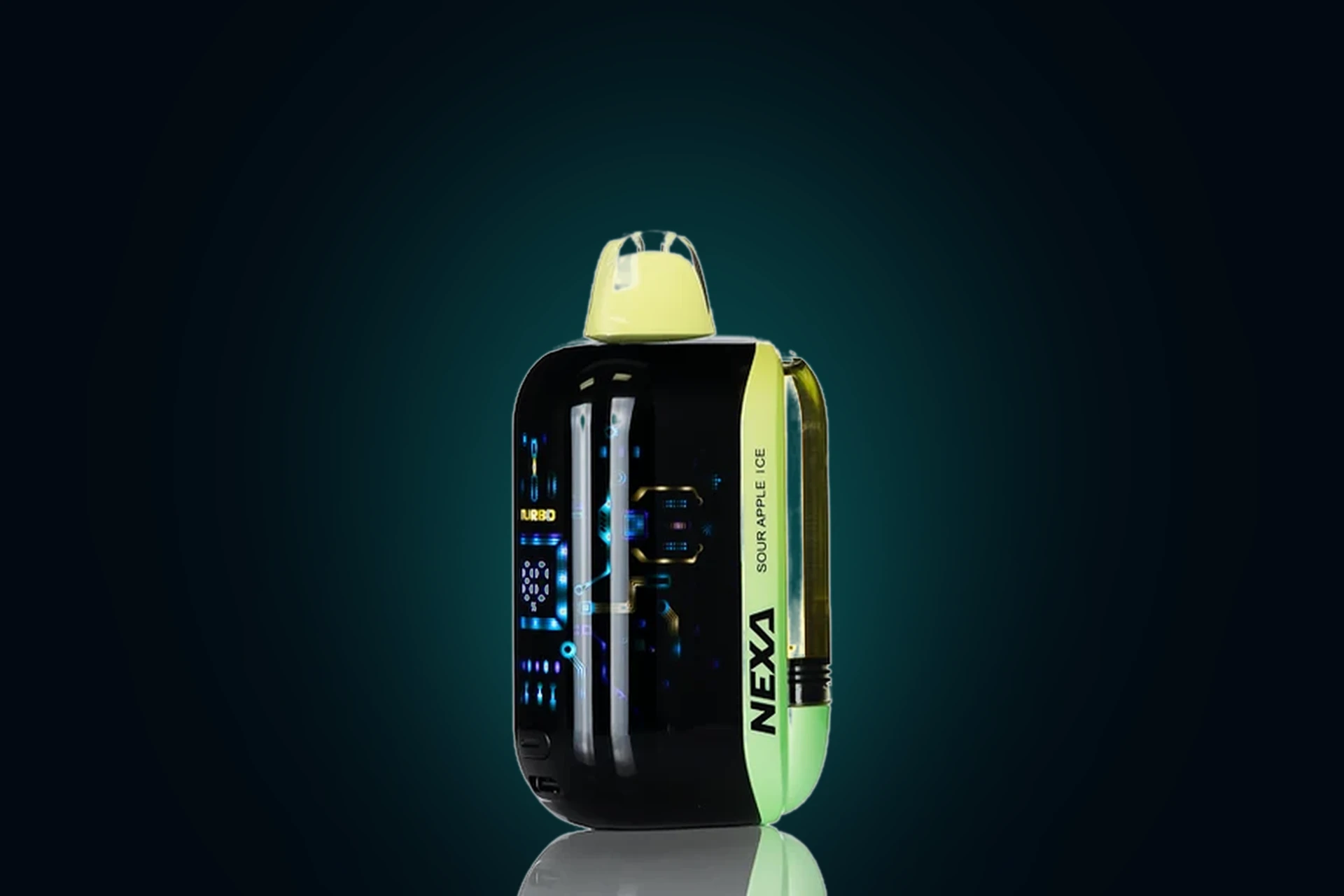
The NEXA Ultra II 50K pairs a rechargeable battery with a transparent crystal tank. The tank arrives separate from the battery, and you press it on until it clicks. That click is the Juicy Lock system at work. It joins the tank liquid to the wick and seals the joint against leaks. The screen sits on the battery section and shows the battery percentage, the e-liquid level, the puff count, and the mode you are in. The screen can switch between a light display and a dark display, and a stealth setting turns the screen animations off for discreet use.
One note on the maker: some retailers list NEXA as a VOOPOO brand, while the brand’s own site credits a company called Mastery Innovations, so the maker is not entirely clear. Do not confuse this model with the original NEXA Ultra 50K, which had an 800mAh battery, a 0.9 ohm coil, and a 5mL plus 15mL split with an older foil-seal assembly. Do not confuse it with the NEXA PIX 35K either, which is a different and smaller model.
| Feature | Detail |
|---|---|
| Device type | Two-part rechargeable disposable, battery section plus transparent crystal tank, not refillable |
| E-liquid capacity | 20mL total, 16mL in the crystal tank plus 4mL in the storage cotton under it |
| Nicotine strength | 5% (50mg/mL) nicotine salt |
| Battery | 900mAh rechargeable, USB-C, pass-through charging so it can be used while plugged in |
| Charging time | Full charge about 1 hour, some listings say 80 minutes |
| Puff count, Normal Mode | Up to 50,000 puffs |
| Puff count, Turbo Mode | Up to 30,000 puffs |
| Coil | Dual mesh, 1.0 ohm |
| Screen | 3D curved screen showing battery percentage, e-liquid level, puff count, and mode |
| Screen modes | Light Mode and Dark Mode, press and hold for 3 seconds to switch |
| Airflow | Adjustable, MTL and RDTL draws |
| Firing | Draw-activated, no fire button |
| Tank system | Juicy Lock, tank ships separate and presses on until it clicks |
| Dimensions | About 28.7 x 53.1 x 93.0 mm |
Normal Mode and Turbo Mode on the NEXA Ultra II 50K
The NEXA Ultra II 50K runs in two modes, and the mode you pick changes the puff count, the warmth, and the battery use. Normal Mode is the long-life setting. Turbo Mode is the stronger setting.
Normal Mode
Normal Mode gives up to 50,000 puffs. It uses less power per draw, so the vapor is cooler and smoother, and the battery lasts longer between charges. This is the mode to use for all-day vaping and for getting the most life out of the 20mL of e-liquid. The dual mesh coils take turns in a gentler way here, which keeps the flavor steady over a long period. If the vapor feels light in Normal Mode, that is normal for the setting. Switch to Turbo Mode only if you want a stronger draw, and expect the puff count and the battery life to drop when you do.
Turbo Mode
Turbo Mode gives up to 30,000 puffs. It pushes more power to both mesh coils at once, so the vapor is warmer, denser, and stronger in flavor. The trade is shorter battery life and faster e-liquid use. The device will also run warmer in Turbo Mode, which is normal as long as it never feels hot to the touch. If the device feels hot, stop using it, let it cool down, and check the auto-firing section of this guide. Turbo Mode is the right pick for a short, strong session, not for stretching the device to its last puff.
VOOPOO NEXA Ultra II 50K Problems at a Glance
| Problem | First thing to check |
|---|---|
| Not charging | Cable, charger, and USB-C port |
| Weak vapor | Battery level, mode, and airflow setting |
| Burnt taste | Wick saturation and e-liquid level |
| Flashing or screen errors | E2 error and tank seating |
| Not firing or not hitting | Tank click, screen, and battery |
| Battery draining quickly | Mode, screen animations, and charge habits |
| Leaking or gurgling | Tank click, seals, and storage position |
| Flavor fading | E-liquid level and the hidden reserve |
| Draw or airflow too tight | Airflow setting and blocked air path |
| Auto-firing or getting hot | Stop using it and let it cool |
Basic check: before you work through any problem below, run this short check. Press the tank onto the battery until you hear and feel a clear click. Wait a minute or two after the first click so the wick can soak up liquid. Look at the screen for the battery percentage and the e-liquid level. Charge the device fully on a 5 volt USB-C charger. Check the airflow setting and move it to a wider opening. Then hold the device upright for a minute. Most of the problems below start with one of these steps, and each section will point back to it and then give only the steps that are unique to that problem.
The NEXA Ultra II 50K is not the only device with a 3D curved screen and two modes. The Geek Bar Pulse X 25K has the same idea: a 3D curved screen that shows battery, liquid level and mode, dual mesh coils, and a bottom toggle that changes mode and airflow together, with the same 25,000 / 15,000 puff split. If your device is a Pulse X, not a NEXA, start with our Geek Bar Pulse X 25K Not Working guide, which covers the same screen, toggle and charging checks for that sealed bar.
VOOPOO NEXA Ultra II 50K Not Working: Ten Problems, Each With a Fix
Why Is the VOOPOO NEXA Ultra II 50K Not Charging?
A NEXA Ultra II 50K that will not charge is one of the most common complaints, and it is also one of the easiest to sort out. The battery is 900mAh and charges over USB-C, and it supports pass-through charging, so you can use it while it is plugged in. When charging works, the screen shows the battery percentage climbing. When nothing shows at all, the fault is usually in the cable, the charger, or the port, not in the battery itself.
Common Causes
A worn or loose USB-C cable is the top cause. Cables that charge a phone fine can still fail on a vape if the connector is bent or dirty. A charger rated above 5 volts can also confuse the charging circuit, and some laptop USB ports give too little power to wake a flat battery. A dirty USB-C port is another common cause, since pocket lint and dust collect in the opening and stop the plug from seating fully. A battery that has sat unused for weeks can drop so low that the screen stays dark for the first few minutes of charging. A cracked port or a battery section that got wet is a deeper fault, and no cable swap will fix that.
How to Fix
- Run the basic check first, then plug the device into a wall charger rated at 5 volts and 1 amp with a different USB-C cable.
- Push the cable in firmly and check that the screen lights up or the battery icon appears within a minute.
- Clean the USB-C port gently with a dry wooden toothpick or a soft brush, and blow out any dust. Do not use a metal pin, and do not use water.
- Leave the device charging for a full hour without unplugging it, and watch the screen for the battery percentage to rise.
- If the device charges on one cable but not another, throw the bad cable away and keep the good one with the device.
When to Replace
Replace the device if it still will not charge after two good cables, two chargers, and a full hour plugged in, and the screen stays dark the whole time. Replace it at once if the port is cracked, loose, or pushed in, if the battery section feels hot while charging, or if it smells burnt. A battery that will not take a charge is finished, and a hot battery is a safety risk, not a repair job.
Why Is the Vapor Weak on the VOOPOO NEXA Ultra II 50K?
Weak vapor means the device fires, but the cloud is thin and the flavor is faint. The screen may look fine, and the battery may read half full or more. The cause is usually a mix of mode, airflow, and wick saturation, and it is worth checking each one in turn before you decide the coil is worn out.
Common Causes
Normal Mode gives a gentler hit by design, so a device set to Normal Mode will always feel weaker than the same device in Turbo Mode. A nearly closed airflow setting also thins the vapor, because less air moves across the coils. A wick that has not soaked up enough liquid after the tank was clicked on will give thin, dry vapor on the first draws. A battery below about 20 percent cannot push the coils hard enough for a full cloud. Near the end of the tank, when the visible liquid is gone and the hidden 4mL reserve in the storage cotton takes over, the vapor gets thinner and the flavor gets lighter. A cold device that sat in a cool room will also feel weaker for the first few draws until it warms up.
How to Fix
- Run the basic check first, then look at the screen and confirm the mode. Switch to Turbo Mode for a few draws and see if the vapor thickens.
- Open the airflow wider and take a slow, steady draw for two to three seconds instead of a short, sharp puff.
- Hold the device upright for two minutes so the liquid can reach the wick, then try again.
- Charge the battery fully and test again on a full charge, since a low battery is a common hidden cause.
- If the tank looks nearly empty on the screen but still has some liquid, keep using it in Normal Mode and accept the lighter vapor, because the reserve is doing its job and the tank is almost done.
When to Replace
Replace the device when the vapor stays thin on a full charge, in Turbo Mode, with the airflow wide open, and the screen shows the e-liquid level at or near empty. That means the tank is finished and the coil has done its work. Replace it sooner if the vapor turns harsh or burnt instead of just thin, because that points to a dry wick that will not recover.
Why Does the VOOPOO NEXA Ultra II 50K Taste Burnt?
A burnt taste is the sharp, harsh flavor that hits the back of the throat and stays there after the draw. It is different from weak flavor, and it is a warning sign. On the NEXA Ultra II 50K it usually means the wick is dry, even if the tank still shows liquid on the screen.
Common Causes
The most common cause is vaping too soon after the tank was first clicked on. The wick needs a minute or two to soak up liquid after the Juicy Lock connection is made, and the first hits on a dry wick will burn it. Chain vaping is the next cause: long draws back to back do not give the wick time to re-soak between hits, so the coil heats a dry spot. Turbo Mode makes this worse, because it pushes more power to the coils and dries the wick faster. A tank that is nearly empty is another cause, since the visible 16mL runs out first and the hidden 4mL reserve feeds the wick more slowly. A tank that is not clicked in fully can also starve the wick, because the liquid path is only half open.
How to Fix
- Run the basic check first, then stop vaping for two minutes and hold the device upright so the liquid can reach the wick.
- Press the tank on again until it clicks, to make sure the Juicy Lock connection is fully seated.
- Take short, gentle draws with a pause of 20 to 30 seconds between them, and stay in Normal Mode for the next few draws.
- If the burnt taste started on the very first hits after assembly, wait a full two minutes before the next draw, because the wick may still be soaking.
- If the taste is only slightly burnt and then clears, the wick has recovered, and you can carry on with slower draws. If the taste stays burnt after five gentle draws, stop.
When to Replace
Replace the device if the burnt taste stays after a two-minute rest, a full tank click, and five slow draws in Normal Mode. A burnt wick does not heal, and every further draw will taste worse. Replace it at once if the burnt taste comes with a hot device, smoke, or a chemical smell. A coil that has burned through is finished, and the tank cannot be refilled or re-wicked.
Why Is the VOOPOO NEXA Ultra II 50K Flashing or Showing a Screen Error?
The 3D curved screen is the device talking to you. It shows the battery percentage, the e-liquid level, the puff count, and the mode, and it flashes when something needs attention. The most important flash to know is the E2 error, which points straight at the tank connection. Other flashes usually mean a low battery or a protection circuit doing its job.
Common Causes
An E2 error with no vapor almost always means the tank is not clicked in fully. The Juicy Lock connection is only half made, so the device cannot read the tank and refuses to fire. A flashing battery icon means the battery is critically low and needs charging. Rapid flashing after a long draw means the protection circuit has cut in, usually because the draw ran too long or the device got too warm from chain vaping. A screen that shows the wrong e-liquid level can happen near the end of the tank, when the visible liquid is gone and the hidden reserve is feeding the wick, because the screen does not show the switch to the reserve. A screen that stays dark can mean a dead battery, a tank that is not seated, or a device that has been in stealth mode with the animations off.
How to Fix
- Run the basic check first, then remove the tank and press it back on until you hear and feel a clear click. An E2 error should clear as soon as the tank seats right.
- Check the screen after the click. If the e-liquid level and the battery percentage appear, the connection is good.
- If the battery icon is flashing, plug the device into a 5 volt USB-C charger for at least 30 minutes before you test it again.
- If the screen flashes fast after a long draw, set the device down for three to five minutes and let it cool before the next draw.
- Press and hold for 3 seconds to switch between Light Mode and Dark Mode if the screen looks dim or hard to read, and check whether the stealth setting has turned the animations off.
- If the screen stays dark on a full charge with the tank clicked in, try the tank reseat once more, then stop.
When to Replace
Replace the device if the E2 error stays after three firm reseats, or if the screen stays dark on a full charge with a seated tank. Replace it at once if the screen flickers, shows broken lines, or the device flashes and gets hot at the same time. A screen that will not light and a tank that will not connect are both signs the device has failed inside, and neither can be fixed from outside.
Why Is the VOOPOO NEXA Ultra II 50K Not Firing or Not Hitting?
Not firing means you draw and nothing happens: no vapor, no flavor, and sometimes no screen activity at all. Not hitting is the wider complaint, and it covers a device that fires weakly or gives air with no vapor. On this device the two complaints usually share the same few causes, and the tank click is the first place to look.
Common Causes
A tank that is not pressed on until it clicks is the top cause. The Juicy Lock seal is not made, the wick gets no liquid, and the device may show an E2 error or stay silent. A dead battery is the next cause, and it is easy to miss because the screen can stay dark when the battery is fully flat. A blocked mouthpiece or airflow inlet can stop the draw sensor from triggering, so the device never knows you are inhaling. A cold or brand-new device that has just been assembled may need a minute for the wick to soak before the first real hit. A device that has reached the end of its e-liquid will also stop hitting, even if the battery still has charge, because there is nothing left to vaporize.
How to Fix
- Run the basic check first, then press the tank on firmly until it clicks, and wait a minute or two for the wick to soak.
- Look at the screen while you draw. If the screen lights up but no vapor comes, the battery and sensor are working, and the problem is the wick or the airflow.
- Charge the device for at least 30 minutes, then try a slow, steady draw for two to three seconds.
- Wipe the mouthpiece with a dry cloth and check the airflow inlet for dust or pocket lint, then open the airflow wider and try again.
- Take the tank off, check that no foil or seal is still stuck on the tank connector, press it back on until it clicks, and test once more. Do not force the tank in from the wrong angle, and do not remove any seal from the tank connector before pressing it on.
When to Replace
Replace the device if it still will not fire after a firm tank click, a full charge, a clean mouthpiece, and an open airflow setting. Replace it sooner if the screen shows the e-liquid level at empty, because the tank is done even if the battery is fine. A device that will not fire after every safe step has an internal fault, and the sealed design means there is nothing left to try.
Why Is the VOOPOO NEXA Ultra II 50K Battery Draining So Fast?
A battery that drains fast will show a full charge in the morning and a low battery warning by the afternoon. The 900mAh battery is a fair size for this device, but Turbo Mode, a bright screen, and heavy use can eat through it quickly. Some fast drain is normal use, and some points to a setting you can change.
Common Causes
Turbo Mode is the biggest drain, because it pushes more power to both mesh coils on every draw. Long, deep draws use more power than short ones, and chain vaping with no pause between draws never lets the battery rest. A bright screen with animations on uses more power than the stealth setting, which switches the animations off. Pass-through charging can hide a weak battery, because the device works fine while plugged in and then drops fast once unplugged. An old device near the end of its life will also hold less charge than it did when new, so the same use drains it faster. Cold weather can make a battery read lower than it really is until the device warms up.
How to Fix
- Run the basic check first, then switch to Normal Mode for everyday use and save Turbo Mode for short sessions.
- Turn the screen animations off with the stealth setting when you do not need them, and switch the screen to Dark Mode.
- Take shorter draws with a pause between them, and avoid chain vaping.
- Charge the device fully to 100 percent on a 5 volt charger, then use it unplugged and watch how fast the percentage falls over an hour of normal use.
- Keep the device at room temperature, and do not leave it in a cold car or a hot pocket, since both extremes hurt battery life.
When to Replace
Replace the device if a full charge drops below 20 percent after only a short session in Normal Mode with the animations off. That means the battery can no longer hold a useful charge. Replace it at once if the battery drains fast and the device feels warm when it is not being used, because a battery that drains on its own is a safety risk. A battery that will not hold a charge is finished, and the sealed battery cannot be swapped.
Most of the problems in this guide are about the device, but it is worth knowing the bigger picture too. Nicotine is addictive no matter how it is delivered, and the flavours and stabilisers in e-cigarettes can inflame delicate lung tissue. The Mayo Clinic Health System warning about the dangers of vaping explains those risks in plain language, including why vaping can last much longer than a cigarette and why nicotine can affect concentration, learning and brain development in young adults.
Why Is the VOOPOO NEXA Ultra II 50K Leaking or Gurgling?
Leaking means liquid escapes the tank and shows up on the battery, on your hands, or in your pocket. Gurgling means the draw sounds wet and bubbly, and you may get a drop of liquid in your mouth, which is called spitback. Both problems come from liquid sitting where air should be, and both usually trace back to the tank joint or to how the device is stored.
Common Causes
A tank that is not clicked in fully is the most common cause. The Juicy Lock seal is only half closed, so liquid seeps out at the joint. A tank that was forced on at the wrong angle can also damage the seal and leave a gap. Storing the device on its side or upside down lets liquid pool against the coil and flood it, which causes gurgling on the next draw. A big temperature swing, like moving from a cold car into a warm room, can push liquid out of the tank as the air inside expands. Overfilling is not possible here, since the tank is prefilled and sealed, but a cracked crystal tank will leak no matter how well it is seated. Chain vaping can also flood the coil, because the wick pulls in more liquid than the coil can vaporize.
How to Fix
- Run the basic check first, then take the tank off, wipe the joint and the battery top dry with a clean cloth, and press the tank back on until it clicks.
- Hold the device upright for five minutes so the liquid settles back into the tank and away from the coil.
- If it gurgles, hold a tissue over the mouthpiece and give two or three short, gentle draws without inhaling, to clear the extra liquid from the air path. Do not blow hard into the mouthpiece.
- Wipe the mouthpiece dry, then take a slow draw and check whether the gurgle is gone.
- Store the device upright in a cool, dry place, and keep it out of direct sun and hot cars.
When to Replace
Replace the device if liquid keeps leaking from the joint after two clean reseats, or if the crystal tank is cracked. A cracked tank cannot be sealed again, and liquid will keep escaping. Replace it at once if liquid gets into the battery section and the device stops firing or starts flashing, because liquid inside the electronics is a safety risk. A tank that leaks every time you fill your pocket with liquid is finished, even if the battery still works.
Why Has the Flavor Faded on the VOOPOO NEXA Ultra II 50K?
Flavor fading means the taste that was rich and clear in the first week is now faint, flat, or hard to place. The vapor may still look fine, but the flavor has gone quiet. This is a slow problem, not a sudden one, and it is tied to how much liquid is left and how old the coil is.
Common Causes
The coil ages with use, and after thousands of draws the mesh surface builds up residue that dulls the flavor. This is normal wear, and it gets worse near the end of the tank. The hidden 4mL reserve is another cause: when the visible 16mL in the crystal tank runs out, the storage cotton underneath takes over, and the flavor thins out in that final stretch. The screen does not show when the switch to the reserve happens, so the fade can feel sudden even though the tank has been emptying for days. Vaping the same flavor for weeks can also dull your sense of it, which is called flavor fatigue, and it feels like the device has faded when your taste buds are just used to it. A low battery can mute flavor too, because the coils do not heat evenly when the power is low.
How to Fix
- Run the basic check first, then charge the battery fully and test the flavor on a full charge in Turbo Mode.
- Check the screen for the e-liquid level. If it is low, the fade is likely the reserve taking over, and the tank is almost done.
- Switch to Normal Mode for a few draws, since a gentler heat can bring out more flavor from an aging coil.
- Take a break from the device for an hour and drink some water, then try again, to rule out flavor fatigue.
- Clean the mouthpiece with a dry cloth, since built-up condensation in the mouthpiece can mute the taste.
When to Replace
Replace the device when the flavor stays faint on a full charge, in Turbo Mode, with the mouthpiece clean, and the screen shows the e-liquid level near empty. That is the coil and the tank reaching the end together. Replace it sooner if the faint flavor turns harsh or chemical, because that means the wick is drying out and the next stage is a burnt taste. A faded coil does not recover, and the tank cannot be refilled with fresh liquid.
Why Is the Draw Too Tight on the VOOPOO NEXA Ultra II 50K?
A tight draw feels like sucking through a narrow straw. You pull hard, you get little vapor, and your cheeks hurt. The device may still fire, but the effort is not worth the cloud. On the NEXA Ultra II 50K the draw is adjustable, so a tight draw is usually a setting or a blockage, not a dead coil.
Common Causes
The airflow slider set to the narrowest opening is the most common cause, and it is easy to knock closed in a pocket. A blocked airflow inlet is next: dust, pocket lint, or dried liquid can narrow the air path. Condensation in the mouthpiece can also narrow the draw, since a drop of liquid sitting in the air path blocks the airflow. A tank that is not clicked in fully can change the air path too, because the joint is not sealed and air leaks in the wrong place. Cold liquid is thicker and moves more slowly, so a device that sat in the cold will feel tighter until it warms up. A nearly empty tank can feel tight as well, because the wick is drying and the coil is not vaporizing freely.
How to Fix
- Run the basic check first, then slide the airflow to the widest opening and take a slow draw to feel the difference.
- Wipe the mouthpiece with a dry cloth and check the airflow inlet for lint or dust, then clear it gently with a dry brush.
- Hold the device upright for a few minutes at room temperature so the liquid thins and the wick can soak.
- Press the tank on until it clicks, to make sure the joint is sealed and the air path is correct.
- Try both MTL and RDTL draws: a short mouth-to-lung pull for a tighter, cigarette-like draw, and a longer restricted direct-to-lung pull for a looser draw, and pick the one that feels right.
When to Replace
Replace the device if the draw stays tight with the airflow wide open, the mouthpiece clean, the tank clicked in, and the battery fully charged. That means the air path or the coil inside is blocked in a way you cannot reach. Replace it sooner if the tight draw comes with a burnt taste or no vapor at all, because the coil is starving for liquid and air at the same time. A draw that never loosens is a sign the device has failed inside.
Why Is the VOOPOO NEXA Ultra II 50K Auto-Firing or Getting Hot?
Auto-firing means the device fires on its own, with no draw at all. You may hear it hiss, see vapor rise from the mouthpiece, or feel it warm up in your pocket. A device that gets hot without being used is the same warning in a different form. This is the one problem in this guide where you should not keep testing fixes. Safety comes first, and the steps below are short on purpose.
Common Causes
Liquid inside the battery section is the most common cause. A leak at the tank joint can let liquid reach the draw sensor, and the sensor then thinks you are inhaling when you are not. A stuck or damaged sensor can do the same thing on its own, with no leak at all. A battery fault can also cause the coil to heat without a draw, and that fault can get worse fast. Heat from the sun or a hot car can push a weak battery over the edge. A device that was dropped may have a shifted contact inside that keeps the circuit closed.
How to Fix
- Stop using the device at once. Do not take another draw.
- If it is safe to touch, set it down on a non-flammable surface away from anything that can burn, and move it away from your face and body.
- If the tank is leaking, wipe the joint dry with a cloth, but do not keep pressing the tank on and off to test it.
- Let the device cool down fully in a safe place. Do not charge it while it is hot, and do not put it in water or in a fridge.
- If it cools down and stays cool, do not trust it again. The fault that caused the auto-fire is still inside.
When to Replace
Replace the device at once. Auto-firing is not a setting problem and not a cleaning problem. A device that fires on its own or gets hot without use is finished, and it should not be charged or used again. If it feels hot to the touch, smells burnt, or shows smoke, move it to a safe outdoor surface if you can do so without burning yourself, and do not use it again under any circumstances.
FAQS (FREQUENTLY ASKED QUESTIONS)
Why Is the VOOPOO NEXA Ultra II 50K Not Working?
The most common reasons are a tank that is not clicked in fully, a dead battery, or a blocked airflow path. Press the tank on until it clicks, wait a minute or two for the wick to soak, charge the battery fully, and check the screen for the battery and e-liquid levels. If the screen stays dark after a full charge and a firm tank click, the device has likely failed inside and needs to be replaced.
Why Is the VOOPOO NEXA Ultra II 50K Not Hitting After Charging?
A full battery reading does not always mean the coil is getting power. The tank may have shifted during charging, so press it on again until it clicks. Wipe the mouthpiece and check the airflow inlet, then take a slow, steady draw. If the screen lights up but no vapor comes, the wick may be dry, so hold the device upright for two minutes and try again. If it still will not hit, the tank may be empty even though the battery is full.
Why Is a Brand-New VOOPOO NEXA Ultra II 50K Not Working?
A brand-new device usually needs two things: the tank pressed on until it clicks, and a minute or two for the wick to soak. The tank ships separate from the battery, so it will not fire until the Juicy Lock connection is made. Charge it for at least 30 minutes first, since batteries often ship partly drained. If it still will not fire after the click, the soak, and a charge, take it back to the retailer, because a new device should work out of the box.
What Does Flashing Mean on the VOOPOO NEXA Ultra II 50K?
Flashing usually means one of three things. An E2 error means the tank is not connected right, so reseat the tank until it clicks. A flashing battery icon means the battery is critically low and needs charging. Rapid flashing after a long draw means the protection circuit has cut in, so let the device cool for three to five minutes. If the flashing stays after a reseat and a full charge, the device has an internal fault.
Why Is the Screen Not Working on the VOOPOO NEXA Ultra II 50K?
A dark screen usually means a dead battery or a tank that is not seated. Charge the device for at least 30 minutes and press the tank on until it clicks, then check again. Press and hold for 3 seconds to switch between Light Mode and Dark Mode, and check whether the stealth setting has turned the animations off. If the screen stays dark on a full charge with a seated tank, the screen or the battery has failed and the device needs to be replaced.
Why Does the E-Liquid Level Look Wrong on the VOOPOO NEXA Ultra II 50K?
The screen shows the liquid in the visible crystal tank, which holds 16mL. It does not show the hidden 4mL reserve in the storage cotton underneath, and it does not show when the device switches to that reserve. So the level can read empty while the device still gives a few more draws, or it can read higher than the flavor suggests near the end. A level that never moves at all, even after days of use, points to a screen or sensor fault.
Why Is the VOOPOO NEXA Ultra II 50K Not Charging?
Check the cable first, then the charger, then the port. Use a different USB-C cable and a wall charger rated at 5 volts and 1 amp, and push the cable in firmly. Clean the port gently with a dry brush if it looks dusty. Leave it plugged in for a full hour. If the screen stays dark after two good cables, two chargers, and an hour plugged in, the battery or the port has failed and the device needs to be replaced.
How Long Does the VOOPOO NEXA Ultra II 50K Take to Charge?
A full charge takes about 1 hour on a 5 volt USB-C charger, though some listings say 80 minutes. The difference comes from the charger and from how flat the battery was when you plugged it in. The screen shows the battery percentage climbing, so you can watch it reach 100 percent. Some listings claim a 30-second quick charge gives about 110 puffs, but treat that as a listing claim, not a tested fact. Do not leave the device charging overnight.
Why Does the VOOPOO NEXA Ultra II 50K Taste Burnt?
A burnt taste usually means the wick is dry. The most common cause is vaping too soon after the tank was first clicked on, before the wick had a minute or two to soak. Chain vaping and Turbo Mode can also dry the wick out. Stop for two minutes, hold the device upright, and take slow draws in Normal Mode. If the burnt taste stays after five gentle draws, the wick has burned and the device needs to be replaced.
How Do You Know When the VOOPOO NEXA Ultra II 50K Is Finished, and Can It Be Refilled?
The device is finished when the screen shows the e-liquid level at empty and the vapor turns thin or burnt, even on a full charge. The flavor also fades in the final stretch as the hidden 4mL reserve takes over. No, it cannot be refilled. The crystal tank is prefilled and sealed, and the coil sits inside it. Trying to open the tank or refill it will break the seal and can cause leaks. When the liquid is gone, replace the whole device.