
Lost Mary Nera Fullview 70K Not Working: Every Problem Explained and Fixed
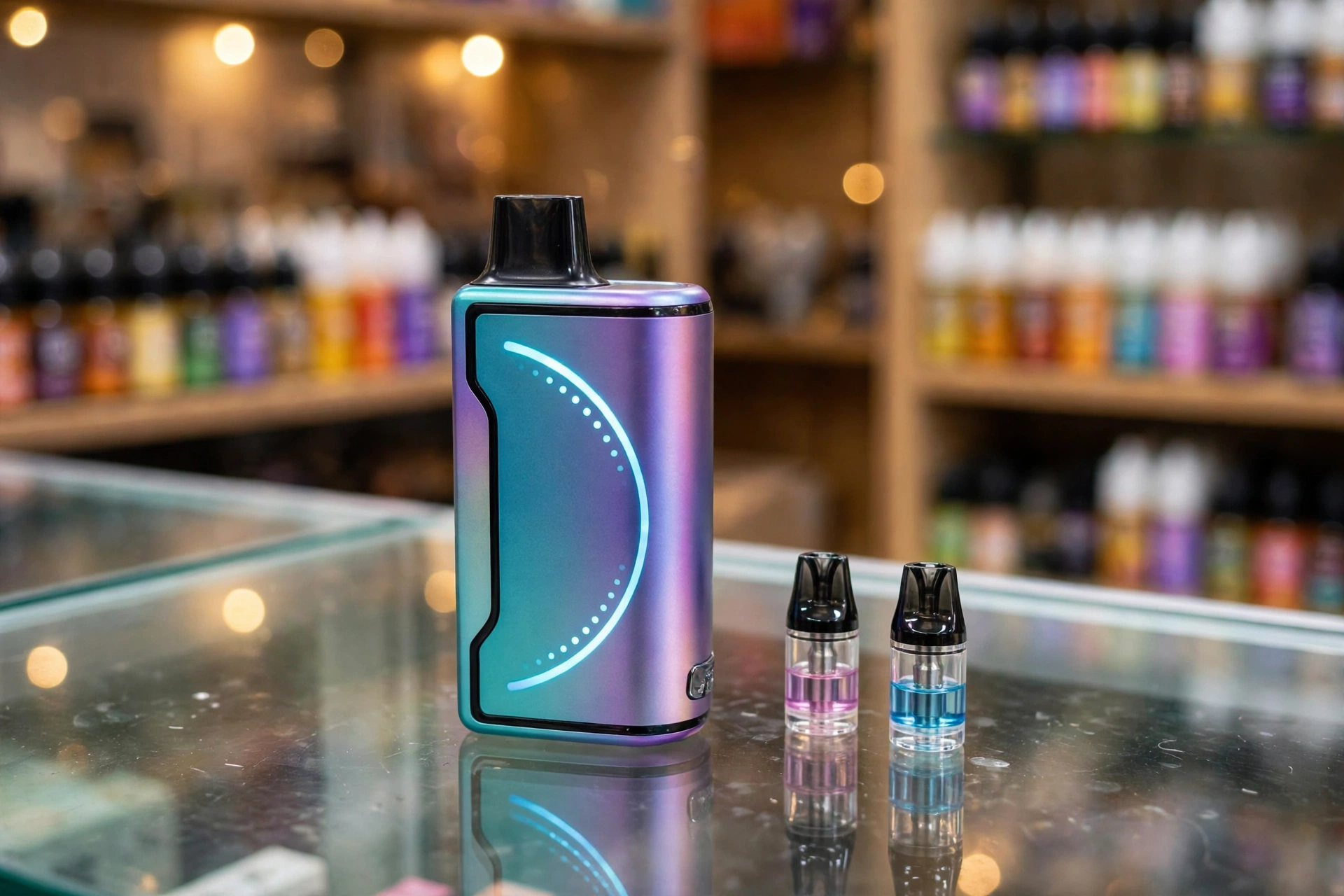
The Lost Mary Nera Fullview 70K is Lost Mary’s first true modular pod system, built for vapers who want huge capacity without throwing away the whole device. Instead of a sealed disposable, you get a rechargeable battery base and two replaceable 12 ml pods that magnetically click into place, delivering up to 70,000 puffs combined. The curved Full-View screen shows battery percentage, e-liquid level per pod, and your current mode at a glance.
But modular systems have their own quirks. Maybe your Lost Mary Nera Fullview 70K is not hitting, the device does not recognize the pod, it refuses to charge, the screen freezes, or a pod starts leaking. The good news is that most Nera Fullview 70K problems come down to pod seating, dirty contacts, or a pod that has simply run its course, and all of them are easy to diagnose at home.
In this guide, we cover every common Lost Mary Nera Fullview 70K problem. Click any problem to jump straight to its fixes:
- Device not hitting or producing no vapor
- Pod not detected or not recognized
- Device not charging
- Screen not working or display not updating
- Flashing or blinking indicators
- Burnt or harsh taste
- Weak flavor or low vapor production
- Leaking, gurgling, or bubbling
- Auto firing or device heating up
- Tight or hard draw
For each problem, you will find a clear explanation of why it happens and step-by-step fixes to get your Nera Fullview 70K working again. By the end, you will know exactly how to troubleshoot the device, how to tell when a pod is finished, and when the battery base itself needs replacing.
Lost Mary Nera Fullview 70K at a Glance
Every fix in this guide is based on the Nera Fullview 70K’s verified features, so here is what you are working with:
- System type: modular pod system, not a sealed disposable. The battery base is reusable; only the pods get replaced.
- Puff rating: up to 70,000 puffs total, 35,000 per 12 ml pod (two pods included in the kit)
- Battery: 800 mAh rechargeable base, USB-C charging (note: a charging cable is not included in the box)
- Display: curved Full-View LED screen showing battery percentage, e-liquid percentage per pod, mode indicator, and puff count
- Modes: Normal Mode for smooth, efficient vaping and Turbo Mode for stronger flavor and denser vapor
- Coils: dual mesh coil configuration in each pod
- Activation: draw-activated. There are no buttons and no power switch.
- Pod connection: magnetic mounting system with electrical contacts on the pod base
- E-liquid: 5 percent (50 mg) nicotine salt, with a transparent viewing window on each pod
Because the Nera Fullview 70K is a pod system, many of its problems are pod problems, not device problems. Swapping in the second pod from your kit is the fastest way to tell which half is at fault.
1. Lost Mary Nera Fullview 70K Not Hitting (No Vapor on Inhale)
The most reported issue is a Lost Mary Nera Fullview 70K not hitting: you draw and nothing happens. With a pod system, this is a seating or seal issue in the vast majority of cases.
Common Causes
- Pod not fully seated. The pod must click magnetically into the battery base. A pod that looks inserted but is not fully seated will not make electrical contact.
- Protective seals still in place. New pods ship with a silicone plug in the mouthpiece and often a film or plug on the pod bottom. Any seal left in place blocks airflow or contacts.
- Dead battery. The 800 mAh base cannot fire the coils when drained, even if the screen briefly flickers.
- Dirty pod contacts. E-liquid residue or dust on the metal contacts between pod and base breaks the circuit.
- Blocked airflow. Lint or residue in the mouthpiece or air inlets chokes the draw sensor.
- Empty pod. A pod that worked for days and gradually stopped hitting has likely run through its 12 ml.
Step-by-Step Fixes
1. Reseat the pod until it clicks
Pull the pod out, check the bottom contacts, and push it back in firmly until you feel the magnetic click. The screen should update within a second to show the pod’s e-liquid level. No click, no connection.
2. Remove every seal and plug
Check the mouthpiece for a clear silicone plug and the pod bottom for any colored plug or protective film. Remove all of them. This is the most common reason a brand new Nera Fullview 70K does not hit.
3. Charge the battery base
Connect a USB-C cable to a wall adapter. The screen shows the battery percentage climbing. Remember the kit does not include a cable, so use any standard USB-C cable you own.
4. Clean the contacts
Remove the pod and wipe the metal contacts on both the pod base and inside the device cavity with a dry, lint-free cloth or cotton swab. Blow out any dust from the cavity before reinserting.
5. Clear the airflow
Wipe the mouthpiece and check the air inlets for blockages. Blow gently through the mouthpiece to clear the air path.
6. Try the second pod
Your kit came with two pods. If the second pod fires and the first does not, the first pod is faulty or empty. This single test tells you whether the problem is the pod or the base.
When to Replace
If both pods are seated, charged, and clean, yet neither fires, the battery base itself has likely failed. If only one pod fails, replace that pod with a fresh Nera pod pack.
2. Lost Mary Nera Fullview 70K Pod Not Detected (Device Does Not Recognize the Pod)
When the screen lights up but the Nera Fullview 70K does not recognize the pod, or the display shows an error or flashes when you draw, the base and pod are not communicating.
Common Causes
- Misaligned pod. The pod is sitting crooked on the magnets and the contacts are not touching.
- Dirty contacts. Residue on the electrical contacts is the number one cause of detection failures.
- Faulty pod. A dead-on-arrival pod with a broken internal connection will never be detected.
- Liquid in the cavity. Leaked e-liquid inside the battery cavity can interfere with the contact pins.
Step-by-Step Fixes
1. Remove and reseat firmly
Take the pod out and push it straight down until the magnets seat with a clear click. Check that it sits level, not tilted.
2. Clean both sets of contacts
Wipe the pod’s bottom contacts and the contact pins inside the device cavity with a dry cloth. If you see liquid in the cavity, dry it thoroughly before reinserting.
3. Swap to the second pod
If the second pod is detected immediately, the first pod is defective. Discard it and use a fresh pod.
4. Check the manual’s error codes
Flash patterns can vary between batches. Your quick-start card lists the specific LED and screen codes for your batch.
When to Replace
If no pod is detected after cleaning and swapping, the base’s contact pins or sensor board may be damaged. Contact the retailer about the battery base.
3. Lost Mary Nera Fullview 70K Not Charging
When your Lost Mary Nera Fullview 70K is not charging, the battery percentage does not move or no charging indicator appears. Since the whole point of the reusable base is to outlast many pods, a charging problem needs quick attention.
Common Causes
- No cable in the box. The Nera Fullview 70K kit does not include a USB-C cable, so first make sure you are actually using a working cable.
- Debris in the charging port. Pocket lint in the USB-C port blocks the connection.
- Wall plug protection tripping. Some Nera bases have short-circuit protection that can cut power when connected to certain high-output wall plugs.
- Damaged cable. Frayed or cheap cables often fail to deliver a stable charge.
- Overheated base. A hot device may refuse to charge as a safety measure.
Step-by-Step Fixes
1. Use a known good USB-C cable
Test your cable with another device first. Then connect the Nera Fullview 70K to a standard 5V wall adapter or a computer USB port rather than a high-wattage fast charger.
2. Clean the USB-C port
Inspect the port for lint or residue and gently clear it with a dry toothpick or cotton swab. Never use liquids or metal tools.
3. Try a different power source
If a wall plug does not work, try a laptop or power bank USB port. If the base’s protection circuit tripped on the wall plug, a gentler source often works.
4. Let a hot base cool down
If the base feels warm, unplug it and let it rest for 15 minutes before trying again.
5. Watch the screen
A successful charge shows the battery percentage climbing on the Full-View display. If nothing appears after a few minutes on a known good cable, the port or battery has likely failed.
When to Replace
If multiple cables and power sources all fail and the port is clean, the battery base needs replacing. The pods themselves are usually still fine and will work with a new base.
4. Lost Mary Nera Fullview 70K Screen Not Working or Display Not Updating
The Nera Fullview 70K’s curved Full-View screen is its signature feature, showing battery percentage, per-pod e-liquid levels, mode, and puff count. When the screen goes dark, freezes, or does not update after a pod swap, use these steps.
Common Causes
- Dead battery. A fully drained base cannot power the display.
- Pod not seated. The screen only shows pod data when it detects a pod. No detection, no pod readouts.
- Temporary software glitch. Like any small display, it can occasionally freeze.
- Damaged screen. A hard drop can crack or kill the display even if the base still fires.
Step-by-Step Fixes
1. Charge the base
Plug in for at least 15 minutes. The screen should wake as the battery recovers.
2. Reseat the pod
Remove the pod and click it back in firmly. The display should refresh within a second to show the new pod’s e-liquid percentage.
3. Soft reset
Remove the pod, wait 30 seconds, and reinsert it. This power-cycles the base and clears most display glitches.
4. Take a test draw
Sometimes the screen wakes on the next draw. If the device fires but the screen stays dark, the display itself is damaged.
When to Replace
A base that still fires with a permanently dark or frozen screen has a dead display. It remains usable by checking the transparent pod window for e-liquid, but most users will want a replacement base.
5. Lost Mary Nera Fullview 70K Flashing or Blinking Indicators
When your Lost Mary Nera Fullview 70K is flashing, the device is flagging a specific condition. The meaning depends on the pattern:
- Flashing with weak or no vapor: the battery is low. Charge the base.
- Flashing right after inserting a pod: the pod is not seated properly or not detected. Reseat it until it clicks.
- Flashing with a full battery and seated pod: the pod is likely empty. Check the e-liquid percentage on the screen or look through the pod window.
- Rapid flashing during use: possible short-circuit protection. Remove the pod, check for liquid in the cavity, dry it, and reinsert.
Step-by-Step Fixes
1. Charge first
Low battery is the most common cause. Top up the base and see if the flashing stops.
2. Reseat the pod
Pull the pod and click it back in firmly, checking that it sits level.
3. Check the e-liquid level
Read the per-pod percentage on the screen or look through the transparent window. An empty pod triggers flashing on many batches.
4. Dry the cavity
If flashing continues with a charged base and full pod, remove the pod and dry the cavity and contacts completely.
When to Replace
Constant flashing after charging, reseating, and drying points to a faulty pod or a damaged base. Swap pods first to identify which half is at fault.
6. Lost Mary Nera Fullview 70K Burnt or Harsh Taste
A burnt taste from the Lost Mary Nera Fullview 70K means the coil is scorching instead of vaporizing liquid. In a pod system, the fix is refreshingly simple: the pod is a replaceable part.
Common Causes
- Empty pod. The 12 ml is finished and the wick is dry.
- Worn coil. After tens of thousands of puffs, the dual mesh coils degrade.
- Chain vaping. Rapid puffing does not give the wick time to re-soak.
- Heavy Turbo Mode use. Turbo fires harder and dries the wick faster.
Step-by-Step Fixes
1. Check the pod level
Read the e-liquid percentage on the screen or look through the pod window. If it is empty, swap in your second pod.
2. Slow down
Wait 15 to 20 seconds between puffs so the wick can re-saturate.
3. Switch to Normal Mode
Normal Mode is gentler on the coils and can extend a pod that is starting to taste harsh in Turbo.
4. Replace the pod
If the burnt taste persists, the coil is permanently scorched. Unlike a sealed disposable, you only replace the pod, not the whole device. The battery base stays.
When to Replace the Pod
Burnt taste that survives resting and mode switching means the pod is done. Swap it. This is the core advantage of the Nera Fullview 70K system: a two-minute pod change instead of buying a whole new device.
7. Lost Mary Nera Fullview 70K Weak Flavor or Low Vapor Production
When your Lost Mary Nera Fullview 70K has weak flavor or thin vapor, the device works but the experience feels flat.
Common Causes
- Aging pod. Coils lose efficiency long before the e-liquid runs out.
- Low e-liquid. A nearly empty pod cannot keep the wick saturated.
- Low battery. Reduced power means reduced vapor.
- Normal Mode expectations. Normal Mode is deliberately softer than Turbo.
- Blocked airflow. Residue in the mouthpiece or inlets thins the vapor.
Step-by-Step Fixes
1. Try Turbo Mode
Switch modes and take a slow draw. If flavor returns, the pod was fine and you simply prefer the stronger setting.
2. Check pod and battery levels
Read both percentages on the screen. Charge the base and consider the pod’s age.
3. Pace your puffs and clear airflow
Slow down, wipe the mouthpiece, and make sure the air inlets are clear.
4. Swap the pod
If a fresh pod tastes dramatically better, the old pod’s coils were spent.
When to Replace the Pod
Flavor that never recovers after charging and mode switching means the pod’s coils are worn out. Replace the pod.
8. Lost Mary Nera Fullview 70K Leaking, Gurgling, or Bubbling
Pod systems can leak where the pod meets the base, and bubbling or gurgling in the Nera Fullview 70K’s mouthpiece usually means liquid has collected where only air should be.
Common Causes
- Drawing too hard. Sharp pulls flood the coil chamber, causing gurgling and spitback.
- Condensation in the mouthpiece. Normal vapor condenses inside the mouthpiece over time.
- Heat exposure. A hot car or direct sun thins e-liquid and encourages leaks.
- Storing upside down. Gravity pulls liquid toward the mouthpiece.
- Worn pod seals. An old pod’s seals weaken and seep.
Step-by-Step Fixes
1. Soften your draw
Use slow, gentle draws. This is the number one fix for gurgling.
2. Clear the mouthpiece
Roll a thin corner of tissue small enough to fit into the mouthpiece, slide it in, and wiggle gently to absorb trapped liquid. Then blow softly through the mouthpiece into a tissue.
3. Dry the pod cavity
Remove the pod and wipe the battery cavity dry. Check the pod’s base for seepage and wipe it clean before reinserting.
4. Store upright and cool
Keep the Nera Fullview 70K standing upright at room temperature, away from heat.
5. Replace a persistently leaky pod
If one pod keeps leaking and the other does not, the seals on the leaky pod have failed. Replace it.
When to Replace the Pod
Light condensation is normal. Constant leaking from the pod seams means failed seals. Replace the pod, and wash your hands after handling leaked e-liquid since it contains nicotine.
9. Lost Mary Nera Fullview 70K Auto Firing or Device Heating Up (Safety)
Auto firing, when the Nera Fullview 70K produces vapor without a draw, or a base that feels hot, needs immediate attention.
Common Causes
- Liquid in the sensor area. Leaked e-liquid reaching the draw sensor can hold it triggered.
- Shorted pod. A damaged pod can cause erratic firing and heat.
- Chain vaping in Turbo. Extended Turbo sessions build real heat.
Step-by-Step Fixes
1. Remove the pod immediately
Separating the pod from the base stops the circuit. Place the base on a non-flammable surface.
2. Let it cool completely
Do not use a hot device. Wait until it returns to room temperature.
3. Dry everything
Wipe the cavity, contacts, and pod base thoroughly. Let the base air-dry upright for an hour.
4. Test with the other pod
If the second pod behaves normally, the first pod was shorted. Discard it.
Safety Note
If auto firing or heating returns, stop using the device entirely. Store the base somewhere safe away from flammable materials and replace it. Never open a pod or the battery base to attempt repairs.
10. Lost Mary Nera Fullview 70K Tight or Hard Draw
A tight draw on the Lost Mary Nera Fullview 70K makes each puff feel restricted, like sipping through a blocked straw.
Common Causes
- Mouthpiece plug still inserted. The clear silicone plug is easy to miss.
- Blocked air inlets. Dust or pocket lint in the base’s airflow paths.
- Condensation buildup. Liquid narrowed the air channel.
- Pod not fully seated. A crooked pod misaligns the airflow path.
Step-by-Step Fixes
1. Check for the plug
Look inside the mouthpiece for the clear silicone stopper and pull it out.
2. Reseat the pod
Remove and reinsert the pod straight and level until it clicks.
3. Clear the air path
Wipe the mouthpiece, clear the air inlets with a dry swab, and blow gently through the mouthpiece.
4. Dry the cavity
Condensation in the base cavity can restrict airflow. Remove the pod and wipe the cavity dry.
When to Replace
A draw that stays tight after clearing and reseating, across both pods, suggests a blocked or damaged base airway. If it affects only one pod, replace that pod.
How to Know When Your Nera Fullview 70K Pod Is Finished
The Nera Fullview 70K makes this easy, which is the whole point of the screen:
- The screen shows 0 percent e-liquid for the pod. The per-pod percentage is your most reliable guide.
- The transparent window looks empty. A quick visual check confirms the reading.
- Persistent burnt taste. A harsh, dry flavor that does not improve means the wick is dry for good.
- Flavor fades and never recovers. Charging and mode switching no longer help.
When a pod is done, pull it out and click in the second pod or a fresh Nera pod pack. The battery base keeps going. Recycle finished pods through an e-waste or battery recycling program rather than throwing them in the trash.
How to Make Your Lost Mary Nera Fullview 70K Last Longer
- Keep contacts clean. A quick wipe of the pod contacts and base cavity every few days prevents most detection and firing issues.
- Seat pods firmly. Every pod swap should end with a clear magnetic click.
- Charge smart. Use a standard USB-C cable and wall adapter, and unplug when the screen shows 100 percent.
- Store upright and cool. Mouthpiece up, room temperature, away from sun and heat.
- Use Normal Mode daily. Save Turbo for when you want extra intensity. It drains pods and battery faster.
- Pace your puffs. Give the wick 15 to 20 seconds between draws.
- Buy authentic. Counterfeit Lost Mary products are widespread and fail far more often. Verify the security code on the packaging through the official Lost Mary website and buy from licensed retailers.
Frequently Asked Questions
How long does it take to charge a Lost Mary Nera Fullview 70K?
The manufacturer does not publish an official charge time, but the 800 mAh base typically reaches full in about 45 to 60 minutes on a standard USB-C wall adapter. The screen shows the battery percentage climbing while it charges. Note that the kit does not include a cable, so use your own USB-C cable.
How many puffs do you get from a Lost Mary Nera Fullview 70K pod?
Each 12 ml pod is rated for up to 35,000 puffs, and the kit includes two pods for up to 70,000 puffs total. Heavy Turbo Mode use will finish pods faster, so treat the rating as an estimate.
Can you mix flavors in the Lost Mary Nera Fullview 70K?
The kit ships with two pods of the same flavor, but replacement Nera pod packs are sold separately, so you can buy two different flavors and rotate between them by swapping pods. Each pod is sealed to its own flavor and cannot be refilled.
Why is my Lost Mary Nera Fullview 70K flashing?
Flashing usually means low battery, a pod that is not seated properly, or an empty pod. Charge the base, reseat the pod until it clicks, and check the e-liquid percentage on the screen.
How do I know when my Nera Fullview 70K pod is empty?
Read the per-pod e-liquid percentage on the curved screen, or look through the transparent pod window. A persistent burnt taste is the final confirmation that the pod is done.
Is the Lost Mary Nera Fullview 70K refillable?
No. The pods are sealed and prefilled. When a pod is finished you replace it with a new Nera pod pack. Only the battery base is reusable.
Is my Lost Mary Nera Fullview 70K fake?
Counterfeits are common. Check for a clearly printed batch number and the embossed triangle on the nicotine warning, and verify the security code on the packaging through the official Lost Mary website. Unusual taste, crackling, or a burnt plastic smell are warning signs after purchase.
The Bottom Line
Almost every Lost Mary Nera Fullview 70K problem traces back to the pod connection: a pod that is not clicked in, dirty contacts, a forgotten seal, or a pod that has simply run dry. Because the system is modular, the fix is usually a thirty-second pod reseat or a two-minute pod swap, not a whole new device. Work through this guide step by step and most Nera Fullview 70K devices come back to life quickly.
Regulations are also reshaping which high-capacity devices can be sold state by state, so it is worth reading our coverage of the state directory laws affecting vape sales. For more troubleshooting guides and vape news, visit Euphoria Vapes.